Learn how to make the star lip look in Dress to Impress using VIP star earrings and the Baddie Pass face. Includes exact position, rotation, and scale settings.
Steps to Make Star Lip Look in Dress to Impress
This Star Lip design is made by adding a VIP accessory on top of a face from the Baddie Pass. It’s not an actual lip item – it’s a creative edit using earrings.
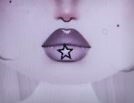
1. Choose the Right Face
Use the 3-Eyed Face from the Baddie Pass.
This face has the same lip shape shown in the image.
2. Add the Star Accessory
Use the VIP Star Earrings.
You’ll only use one star, and place it in the center of the bottom lip.
3. Apply These Accessory Settings
Adjust the star with the following values:
Position:
- X: 0.66
- Y: 0.51
- Z: 0.60
Rotation:
- X: 0.50
- Y: 0.42
- Z: 0.48
Scale:
- 0.76
4. Final Check
The star should sit neatly on the middle of the lip, matching the look in the picture – small, centered, and clean.
Read more: Dress to Impress Codes, Dress to Impress Themes Wheel